Encapsulation in C++
Table of Contents
- What is Encapsulation?
- How to Achieve Encapsulation
- Why is Encapsulation Needed? Benefits
- Real-World Examples
- Best Practices
- Common Mistakes to Avoid
- Summary
1. What is Encapsulation?
Encapsulation is the bundling of data (attributes) and methods (functions) that operate on that data into a single unit (class), while restricting direct access to some of the object’s components. It’s about data hiding and controlling access to the internal state of an object.
Core Principles
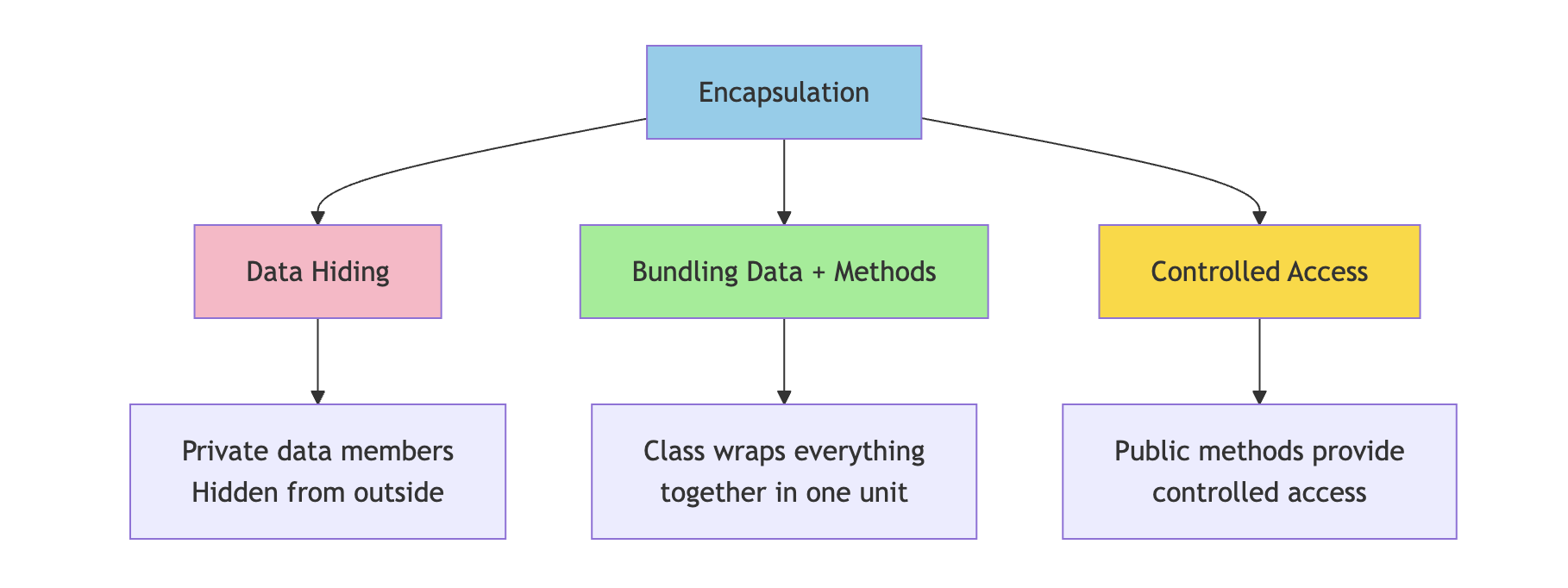
Encapsulation involves three key concepts:
- Data Hiding - Keeping internal data private
- Bundling - Grouping related data and methods together
- Controlled Access - Providing specific methods to interact with data
Think of it as putting data in a protective capsule where:
- Internal details are hidden from outside
- Access is controlled through specific methods
- Data integrity is maintained through validation
Simple Analogy
Think of a medicine capsule:
- The capsule shell protects the medicine inside
- You cannot directly access the medicine (it’s hidden)
- You take the whole capsule as intended (controlled access)
- The medicine is bundled safely inside the capsule
Similarly, in programming:
- Class is the capsule
- Data members are the medicine (protected content)
- Public methods are the intended way to use it
2. How to Achieve Encapsulation
Encapsulation is achieved using access specifiers in C++. The typical pattern is:
- Make data members private
- Provide public methods (getters and setters) to access and modify data
- Add validation logic in methods to ensure data integrity
2.1 Making Data Members Private
By making data members private, we prevent direct access from outside the class.
class BankAccount {
private:
    // Private data members - hidden from outside
    string accountHolder;
    long accountNumber;
    double balance;
    string pin;

public:
    // Public methods will be added here
};
Why Private?
BankAccount account;

// This is prevented (good!)
// account.balance = 1000000;  // ✗ Error: balance is private
// account.pin = "0000";        // ✗ Error: pin is private

// This ensures data can only be modified through controlled methods
2.2 Providing Public Methods
Public methods (getters and setters) provide controlled access to private data.
class BankAccount {
private:
    string accountHolder;
    long accountNumber;
    double balance;
    string pin;

public:
    // Getter methods - Read access
    string getAccountHolder() {
        return accountHolder;
    }

    long getAccountNumber() {
        return accountNumber;
    }

    double getBalance() {
        return balance;
    }

    // Setter methods - Write access with control
    void setAccountHolder(string name) {
        if (!name.empty()) {
            accountHolder = name;
        } else {
            cout << "Error: Name cannot be empty!" << endl;
        }
    }

    void setPin(string oldPin, string newPin) {
        if (oldPin == pin && newPin.length() == 4) {
            pin = newPin;
            cout << "PIN changed successfully!" << endl;
        } else {
            cout << "Error: Invalid PIN change request!" << endl;
        }
    }

    // Note: No direct setter for balance
    // Balance can only be modified through deposit/withdraw
};
2.3 Validation and Control
The real power of encapsulation comes from adding validation logic in methods.
class BankAccount {
private:
    string accountHolder;
    long accountNumber;
    double balance;
    string pin;
    bool isLocked;

public:
    // Constructor
    BankAccount(string name, long accNum, string p) {
        accountHolder = name;
        accountNumber = accNum;
        balance = 0.0;
        pin = p;
        isLocked = false;
    }

    // Deposit with validation
    void deposit(double amount) {
        if (isLocked) {
            cout << "Account is locked!" << endl;
            return;
        }

        if (amount > 0 && amount <= 100000) {
            balance += amount;
            cout << "Deposited: $" << amount << endl;
            cout << "New Balance: $" << balance << endl;
        } else {
            cout << "Invalid deposit amount!" << endl;
        }
    }

    // Withdraw with multiple validations
    void withdraw(string inputPin, double amount) {
        if (isLocked) {
            cout << "Account is locked!" << endl;
            return;
        }

        if (inputPin != pin) {
            cout << "Incorrect PIN!" << endl;
            return;
        }

        if (amount <= 0) {
            cout << "Invalid amount!" << endl;
            return;
        }

        if (amount > balance) {
            cout << "Insufficient funds!" << endl;
            cout << "Available balance: $" << balance << endl;
            return;
        }

        balance -= amount;
        cout << "Withdrawn: $" << amount << endl;
        cout << "Remaining Balance: $" << balance << endl;
    }

    // Transfer with validation
    void transfer(string inputPin, BankAccount& recipient, double amount) {
        if (inputPin != pin) {
            cout << "Incorrect PIN!" << endl;
            return;
        }

        if (amount > balance) {
            cout << "Insufficient funds for transfer!" << endl;
            return;
        }

        balance -= amount;
        recipient.balance += amount;
        cout << "Transferred $" << amount << " to " << recipient.accountHolder << endl;
    }

    // View balance (requires authentication)
    void viewBalance(string inputPin) {
        if (inputPin == pin) {
            cout << "Account Balance: $" << balance << endl;
        } else {
            cout << "Incorrect PIN!" << endl;
        }
    }

    // Lock/Unlock account
    void lockAccount(string inputPin) {
        if (inputPin == pin) {
            isLocked = true;
            cout << "Account locked successfully!" << endl;
        }
    }

    void unlockAccount(string inputPin) {
        if (inputPin == pin) {
            isLocked = false;
            cout << "Account unlocked successfully!" << endl;
        }
    }
};
Usage Example:
int main() {
    BankAccount account1("John Doe", 123456789, "1234");
    BankAccount account2("Jane Smith", 987654321, "5678");

    // Controlled access through public methods
    account1.deposit(5000);
    account1.withdraw("1234", 2000);
    account1.viewBalance("1234");

    // Transfer between accounts
    account1.transfer("1234", account2, 1000);

    // Cannot directly access or modify balance
    // account1.balance = 999999;  // ✗ Error: balance is private

    return 0;
}
3. Why is Encapsulation Needed? Benefits
Benefits Table
| Benefit | Description | Example |
|---|---|---|
| Data Protection | Prevents unauthorized or accidental modification of data | Bank balance cannot be directly set to negative values |
| Data Validation | Ensures only valid data is stored | Age cannot be set to -5 or 500; email must contain @ symbol |
| Flexibility | Internal implementation can change without affecting external code | Can change how balance is calculated internally without breaking client code |
| Maintainability | Easier to modify and maintain code | Changes to internal logic don’t break code that uses the class |
| Security | Sensitive data remains hidden and protected | PIN, password, credit card details cannot be accessed directly |
| Control | Complete control over how data is accessed and modified | Can add logging, authentication, or business rules in methods |
| Debugging | Easier to track where data is modified | Only specific methods modify data, making bugs easier to find |
| Consistency | Ensures data remains in valid state | Account balance always consistent with transactions |
Detailed Examples of Benefits
1. Data Protection
class Student {
private:
    float marks;  // Protected from invalid values

public:
    void setMarks(float m) {
        if (m >= 0 && m <= 100) {
            marks = m;
        } else {
            cout << "Error: Marks must be between 0 and 100!" << endl;
        }
    }
};

// Without encapsulation (dangerous):
// student.marks = -50;  // Would allow invalid data
// student.marks = 150;  // Would allow invalid data

// With encapsulation (safe):
Student student;
student.setMarks(85);    // ✓ Valid
student.setMarks(-50);   // ✗ Rejected
student.setMarks(150);   // ✗ Rejected
2. Flexibility and Maintainability
class Employee {
private:
    double baseSalary;
    double bonus;

    // Internal implementation can change without affecting external code
    double calculateTotalSalary() {
        // Version 1: Simple addition
        return baseSalary + bonus;

        // Later, can change to:
        // Version 2: Include tax calculation
        // double tax = baseSalary * 0.2;
        // return baseSalary + bonus - tax;

        // External code using getSalary() doesn't need to change!
    }

public:
    double getSalary() {
        return calculateTotalSalary();
    }
};
3. Security
class User {
private:
    string username;
    string passwordHash;  // Never store plain password
    string email;

    string hashPassword(string password) {
        // Complex hashing algorithm
        return "hashed_" + password;  // Simplified for example
    }

public:
    void setPassword(string oldPassword, string newPassword) {
        if (hashPassword(oldPassword) == passwordHash) {
            passwordHash = hashPassword(newPassword);
            cout << "Password changed successfully!" << endl;
        } else {
            cout << "Incorrect old password!" << endl;
        }
    }

    bool login(string inputPassword) {
        return (hashPassword(inputPassword) == passwordHash);
    }

    // No getter for password - security!
    // Cannot retrieve actual password
};
4. Control and Business Logic
class ShoppingCart {
private:
    vector<string> items;
    double totalPrice;
    int itemCount;

    void updateTotal(double price) {
        totalPrice += price;
        itemCount++;

        // Can add business logic here
        if (totalPrice > 1000) {
            cout << "Free shipping applied!" << endl;
        }
    }

    void logActivity(string action) {
        cout << "[LOG] " << action << " at " << /* current time */ endl;
    }

public:
    void addItem(string item, double price) {
        if (price < 0) {
            cout << "Invalid price!" << endl;
            return;
        }

        items.push_back(item);
        updateTotal(price);
        logActivity("Item added: " + item);

        cout << "Item added to cart. Total: $" << totalPrice << endl;
    }

    void removeItem(string item, double price) {
        // Find and remove item
        totalPrice -= price;
        itemCount--;
        logActivity("Item removed: " + item);
    }

    double getTotal() {
        return totalPrice;
    }
};
4. Real-World Examples
4.1 ATM Machine Example
An ATM machine is a perfect example of encapsulation in real life.
class ATM {
private:
    // Hidden internal components (Encapsulation)
    double cashAvailable;
    map<string, double> accountBalances;
    map<string, string> accountPins;
    vector<string> transactionLog;

    // Private helper methods (Hidden implementation)
    bool authenticateUser(string cardNumber, string pin) {
        if (accountPins.find(cardNumber) != accountPins.end()) {
            return accountPins[cardNumber] == pin;
        }
        return false;
    }

    bool checkCashAvailability(double amount) {
        return (cashAvailable >= amount);
    }

    void dispenseCash(double amount) {
        // Complex mechanical operations hidden
        cout << "Dispensing cash..." << endl;
        cout << "Please collect $" << amount << endl;
        cashAvailable -= amount;
    }

    void logTransaction(string cardNumber, string type, double amount) {
        string log = cardNumber + " - " + type + " - $" + to_string(amount);
        transactionLog.push_back(log);
    }

    void printReceipt(string cardNumber, string type, double amount, double balance) {
        cout << "\n========== RECEIPT ==========" << endl;
        cout << "Account: ****" << cardNumber.substr(cardNumber.length() - 4) << endl;
        cout << "Transaction: " << type << endl;
        cout << "Amount: $" << amount << endl;
        cout << "Balance: $" << balance << endl;
        cout << "============================\n" << endl;
    }

public:
    // Constructor
    ATM(double initialCash) : cashAvailable(initialCash) {}

    // Public interface (Simple methods for users)
    void addAccount(string cardNumber, string pin, double initialBalance) {
        accountPins[cardNumber] = pin;
        accountBalances[cardNumber] = initialBalance;
    }

    void withdrawMoney(string cardNumber, string pin, double amount) {
        cout << "\nProcessing withdrawal..." << endl;

        if (!authenticateUser(cardNumber, pin)) {
            cout << "Authentication failed! Incorrect PIN." << endl;
            return;
        }

        if (accountBalances[cardNumber] < amount) {
            cout << "Insufficient funds!" << endl;
            cout << "Available balance: $" << accountBalances[cardNumber] << endl;
            return;
        }

        if (!checkCashAvailability(amount)) {
            cout << "ATM has insufficient cash. Please try a smaller amount." << endl;
            return;
        }

        // All checks passed, process withdrawal
        accountBalances[cardNumber] -= amount;
        dispenseCash(amount);
        logTransaction(cardNumber, "Withdrawal", amount);
        printReceipt(cardNumber, "Withdrawal", amount, accountBalances[cardNumber]);
    }

    void depositMoney(string cardNumber, string pin, double amount) {
        cout << "\nProcessing deposit..." << endl;

        if (!authenticateUser(cardNumber, pin)) {
            cout << "Authentication failed! Incorrect PIN." << endl;
            return;
        }

        if (amount <= 0) {
            cout << "Invalid deposit amount!" << endl;
            return;
        }

        accountBalances[cardNumber] += amount;
        cashAvailable += amount;
        logTransaction(cardNumber, "Deposit", amount);

        cout << "Deposit successful!" << endl;
        printReceipt(cardNumber, "Deposit", amount, accountBalances[cardNumber]);
    }

    void checkBalance(string cardNumber, string pin) {
        cout << "\nChecking balance..." << endl;

        if (!authenticateUser(cardNumber, pin)) {
            cout << "Authentication failed! Incorrect PIN." << endl;
            return;
        }

        cout << "Current Balance: $" << accountBalances[cardNumber] << endl;
    }

    void changePin(string cardNumber, string oldPin, string newPin) {
        cout << "\nChanging PIN..." << endl;

        if (!authenticateUser(cardNumber, oldPin)) {
            cout << "Authentication failed! Incorrect current PIN." << endl;
            return;
        }

        if (newPin.length() != 4) {
            cout << "PIN must be 4 digits!" << endl;
            return;
        }

        accountPins[cardNumber] = newPin;
        cout << "PIN changed successfully!" << endl;
    }
};

// Usage
int main() {
    ATM atm(50000);  // ATM with $50,000 cash

    // Add accounts
    atm.addAccount("1234567890123456", "1234", 5000);
    atm.addAccount("9876543210987654", "5678", 3000);

    // User interactions - simple and clean
    atm.checkBalance("1234567890123456", "1234");
    atm.withdrawMoney("1234567890123456", "1234", 500);
    atm.depositMoney("1234567890123456", "1234", 1000);
    atm.changePin("1234567890123456", "1234", "9999");

    // Cannot access internal data (encapsulated)
    // atm.cashAvailable = 0;  // ✗ Error: private member
    // atm.accountBalances["1234567890123456"] = 999999;  // ✗ Error: private

    return 0;
}
Key Points of ATM Encapsulation:
- Users interact through simple buttons/methods
- Internal mechanisms (cash counting, authentication algorithms) are hidden
- Cannot directly access cash or account balances
- All operations go through validation
- Complex security and logging happen behind the scenes
4.2 Smart Thermostat Example
class SmartThermostat {
private:
    double currentTemperature;
    double targetTemperature;
    bool isHeatingOn;
    bool isCoolingOn;
    string mode;  // "auto", "heat", "cool", "off"
    int fanSpeed;

    // Private methods - hidden complexity
    void adjustHeating() {
        if (currentTemperature < targetTemperature - 1) {
            isHeatingOn = true;
            isCoolingOn = false;
        } else {
            isHeatingOn = false;
        }
    }

    void adjustCooling() {
        if (currentTemperature > targetTemperature + 1) {
            isCoolingOn = true;
            isHeatingOn = false;
        } else {
            isCoolingOn = false;
        }
    }

    void autoRegulate() {
        if (currentTemperature < targetTemperature - 1) {
            adjustHeating();
        } else if (currentTemperature > targetTemperature + 1) {
            adjustCooling();
        } else {
            isHeatingOn = false;
            isCoolingOn = false;
        }
    }

public:
    SmartThermostat() {
        currentTemperature = 20.0;
        targetTemperature = 22.0;
        isHeatingOn = false;
        isCoolingOn = false;
        mode = "auto";
        fanSpeed = 2;
    }

    // Simple public interface
    void setTargetTemperature(double temp) {
        if (temp >= 15.0 && temp <= 30.0) {
            targetTemperature = temp;
            cout << "Target temperature set to " << temp << "°C" << endl;
            autoRegulate();
        } else {
            cout << "Temperature must be between 15°C and 30°C" << endl;
        }
    }

    double getTargetTemperature() {
        return targetTemperature;
    }

    double getCurrentTemperature() {
        return currentTemperature;
    }

    void setMode(string m) {
        if (m == "auto" || m == "heat" || m == "cool" || m == "off") {
            mode = m;
            cout << "Mode set to: " << mode << endl;
        } else {
            cout << "Invalid mode!" << endl;
        }
    }

    string getMode() {
        return mode;
    }

    void displayStatus() {
        cout << "\n===== Thermostat Status =====" << endl;
        cout << "Current: " << currentTemperature << "°C" << endl;
        cout << "Target: " << targetTemperature << "°C" << endl;
        cout << "Mode: " << mode << endl;
        cout << "Heating: " << (isHeatingOn ? "ON" : "OFF") << endl;
        cout << "Cooling: " << (isCoolingOn ? "ON" : "OFF") << endl;
        cout << "============================\n" << endl;
    }

    // Simulate temperature change (for testing)
    void simulateTemperatureChange(double change) {
        currentTemperature += change;
        cout << "Temperature changed to " << currentTemperature << "°C" << endl;
        autoRegulate();
    }
};
4.3 Email Account Example
class EmailAccount {
private:
    string emailAddress;
    string password;
    vector<string> inbox;
    vector<string> sent;
    vector<string> spam;
    int storageUsed;  // in MB
    int storageLimit;

    bool isValidEmail(string email) {
        return email.find('@') != string::npos;
    }

    bool isSpam(string message) {
        // Simplified spam detection
        return message.find("FREE MONEY") != string::npos ||
               message.find("CLICK HERE NOW") != string::npos;
    }

    void updateStorage(int size) {
        storageUsed += size;
    }

public:
    EmailAccount(string email, string pass) {
        if (isValidEmail(email)) {
            emailAddress = email;
            password = pass;
            storageUsed = 0;
            storageLimit = 1000;  // 1000 MB
        }
    }

    void receiveEmail(string from, string message) {
        if (storageUsed >= storageLimit) {
            cout << "Storage full! Cannot receive email." << endl;
            return;
        }

        string email = "From: " + from + " - " + message;

        if (isSpam(message)) {
            spam.push_back(email);
            cout << "Email moved to spam folder" << endl;
        } else {
            inbox.push_back(email);
            cout << "New email received from " << from << endl;
        }

        updateStorage(1);  // Each email = 1 MB
    }

    void sendEmail(string to, string message) {
        if (!isValidEmail(to)) {
            cout << "Invalid recipient email!" << endl;
            return;
        }

        string email = "To: " + to + " - " + message;
        sent.push_back(email);
        updateStorage(1);

        cout << "Email sent to " << to << endl;
    }

    void viewInbox() {
        cout << "\n===== INBOX =====" << endl;
        if (inbox.empty()) {
            cout << "No messages" << endl;
        } else {
            for (size_t i = 0; i < inbox.size(); i++) {
                cout << i + 1 << ". " << inbox[i] << endl;
            }
        }
        cout << "================\n" << endl;
    }

    void getStorageInfo() {
        cout << "Storage: " << storageUsed << " MB / " << storageLimit << " MB" << endl;
        cout << "Available: " << (storageLimit - storageUsed) << " MB" << endl;
    }

    void changePassword(string oldPass, string newPass) {
        if (oldPass == password) {
            if (newPass.length() >= 8) {
                password = newPass;
                cout << "Password changed successfully!" << endl;
            } else {
                cout << "Password must be at least 8 characters!" << endl;
            }
        } else {
            cout << "Incorrect password!" << endl;
        }
    }
};
5. Best Practices
1. Always Make Data Members Private
// ✓ Good
class Person {
private:
    string name;
    int age;
public:
    void setAge(int a) {
        if (a >= 0 && a <= 150) age = a;
    }
};

// ✗ Bad
class Person {
public:
    string name;
    int age;  // Anyone can set age to -5 or 9999
};
2. Provide Getters and Setters with Validation
class Product {
private:
    string name;
    double price;
    int quantity;

public:
    // Getter - simple read access
    double getPrice() {
        return price;
    }

    // Setter with validation
    void setPrice(double p) {
        if (p > 0) {
            price = p;
        } else {
            cout << "Price must be positive!" << endl;
        }
    }

    // Controlled modification
    void updateQuantity(int change) {
        if (quantity + change >= 0) {
            quantity += change;
        } else {
            cout << "Insufficient quantity!" << endl;
        }
    }
};
3. Don’t Provide Setters for Everything
class Order {
private:
    string orderID;
    double totalAmount;
    string status;

public:
    // Read-only access (no setter)
    string getOrderID() {
        return orderID;
    }

    double getTotalAmount() {
        return totalAmount;
    }

    // Controlled state changes only
    void processPayment() {
        if (status == "pending") {
            status = "paid";
            // Process payment logic
        }
    }

    void shipOrder() {
        if (status == "paid") {
            status = "shipped";
        }
    }

    // No direct setStatus() method - status changes through business logic only
};
4. Use Const for Getters
class Rectangle {
private:
    double length;
    double width;

public:
    // Const getter - promises not to modify object
    double getLength() const {
        return length;
    }

    double getWidth() const {
        return width;
    }

    double getArea() const {
        return length * width;
    }
};
5. Encapsulate Related Data Together
// ✓ Good - Related data encapsulated together
class Address {
private:
    string street;
    string city;
    string state;
    string zipCode;

public:
    string getFullAddress() const {
        return street + ", " + city + ", " + state + " " + zipCode;
    }
};

class Person {
private:
    string name;
    Address homeAddress;
    Address workAddress;
};
6. Common Mistakes to Avoid
Mistake 1: Making Everything Public
// ✗ Bad - No encapsulation
class Student {
public:
    string name;
    int age;
    float marks;
};

// Anyone can do:
Student s;
s.marks = -50;  // Invalid data!
s.age = 999;    // Invalid data!
Mistake 2: Getters/Setters for Everything Without Validation
// ✗ Bad - Useless encapsulation
class Person {
private:
    int age;
public:
    void setAge(int a) { age = a; }  // No validation!
    int getAge() { return age; }
};

// Not much better than:
class Person {
public:
    int age;
};
Mistake 3: Returning References to Private Data
// ✗ Bad - Breaks encapsulation
class Database {
private:
    vector<string> records;
public:
    vector<string>& getRecords() {
        return records;  // Returns reference - caller can modify!
    }
};

// Better:
vector<string> getRecords() const {
    return records;  // Returns copy - safe
}
Mistake 4: Not Validating in Constructors
// ✗ Bad
class BankAccount {
private:
    double balance;
public:
    BankAccount(double b) {
        balance = b;  // Could be negative!
    }
};

// ✓ Good
class BankAccount {
private:
    double balance;
public:
    BankAccount(double b) {
        if (b >= 0) {
            balance = b;
        } else {
            balance = 0;
            cout << "Invalid initial balance. Set to 0." << endl;
        }
    }
};
Summary
Encapsulation is one of the fundamental pillars of object-oriented programming. It provides:
- Data Protection - Private members prevent unauthorized access
- Controlled Access - Public methods with validation ensure data integrity
- Flexibility - Internal implementation can change without affecting external code
- Security - Sensitive data remains hidden
- Maintainability - Easier to debug and modify
Key Takeaways
- Make data members private by default
- Provide public methods (getters/setters) with validation
- Bundle related data and methods together in a class
- Hide implementation details from outside world
- Control how data is accessed and modified
Quick Reference
class EncapsulationExample {
private:
    // 1. Hide data
    int privateData;

    // 2. Hide complex implementation
    void complexInternalMethod() {
        // Hidden complexity
    }

public:
    // 3. Provide controlled access
    void setData(int value) {
        if (value >= 0) {  // 4. Add validation
            privateData = value;
        }
    }

    int getData() const {  // 5. Use const for read-only
        return privateData;
    }
};
Encapsulation creates robust, secure, and maintainable code by protecting your data and providing controlled access through well-defined interfaces!